
What is Airtop?
Overview
Airtop is a cloud browser platform that allows you, your AI Agent, or your automation tools to control a web browser in the cloud.
Any application that wants to automate actions on behalf of users has 2 options:
- Use a service’s APIs
- Use a browser automation tool and interact with a web application directly.
Quite often, the first option is not possible because the service’s API is unavailable or does not provide the necessary functionality, so developers must go with option #2.
However, browser automation is very challenging to do well at scale for the following reasons:
- Infrastructure Complexity: Properly managing a browser infrastructure is a complex task. You need to manage a cluster of virtual machines, maintain pre-warmed pools of browsers, ensure high availability, manage security of browser sessions, keep browser versions updated to prevent security vulnerabilities, and more.
- High Cost: Managing a fleet of browsers is expensive, both in terms of money and infrastructure. In particular, keeping a warm pool of browsers to guarantee high availability is very resource-intensive and not where you want to spend your money.
- Fragile Scripts: Writing Puppeteer/Playwright/Selenium scripts is fragile. CSS selectors often break when the page is updated, and the scripts are hard to maintain and scale.
- Anti-bot Detection: Most web applications have anti-bot detection mechanisms that make it difficult to automate actions at scale. You need to deal with CAPTCHAs, residential proxies, fingerprinting, and more.
- Authentication: Many web applications have authentication mechanisms that make it difficult to automate actions on behalf of users. You need to handle OAuth, SSO, 2FA, and other methods, all with exceptional security requirements.
Airtop solves all of these problems by offering you a simple, scalable, and cost-effective service to run large numbers of browser sessions in the cloud and automate actions via natural language, all through a powerful, yet simple API.
How it works
Creating a browser session
The first step to using Airtop is to create a browser session, which is as simple as a single line of code.
This will instantiate a cloud browser that you can use to navigate the web, either directly as an end-user, or via an API as an AI Agent.
AI APIs
Airtop offers a powerful AI API that allows your agent to control the browser through natural language. For example, suppose that you wanted to extract all the search results in a product search page, including across all pages of results. You could simply call this API with your prompt:
These APIs are powered by a state-of-the-art LLM that understands the structure of the web, and can navigate complex pages. We use a multi-modal approach that incorporates visual information, text, and DOM structure to understand and navigate pages.
This is an excellent option if you want to automate the browser without having to go deep into the DOM structure and craft site specific scripts.
Playwright/Puppeteer/Selenium scripts
There are times when you do want lower level control of your automation. We fully support Playwright, Puppeteer, and Selenium scripts, and can easily integrate with them.
Here is a brief example of how to use Puppeteer/Playwright with Airtop:
Authentication
Often times, you will need to automate a web application that requires authentication. Airtop offers a powerful authentication system that allows you to ask your users to login, and subsequently allow your agents to continue browsing the web on their behalf.
First, you create a browser session as shown above. Then, you can create a live browser view, which you can embed in your own web app and allow your users to interact and log in to the target site.
Once the user logs in, you can save the session profile, which includes all cookies and other artifacts of the browser session. You can subsequently instantiate new browser sessions with that profile, which will include the authenticated state. We never store any actual credentials, including passwords and store the entire profile fully encrypted.
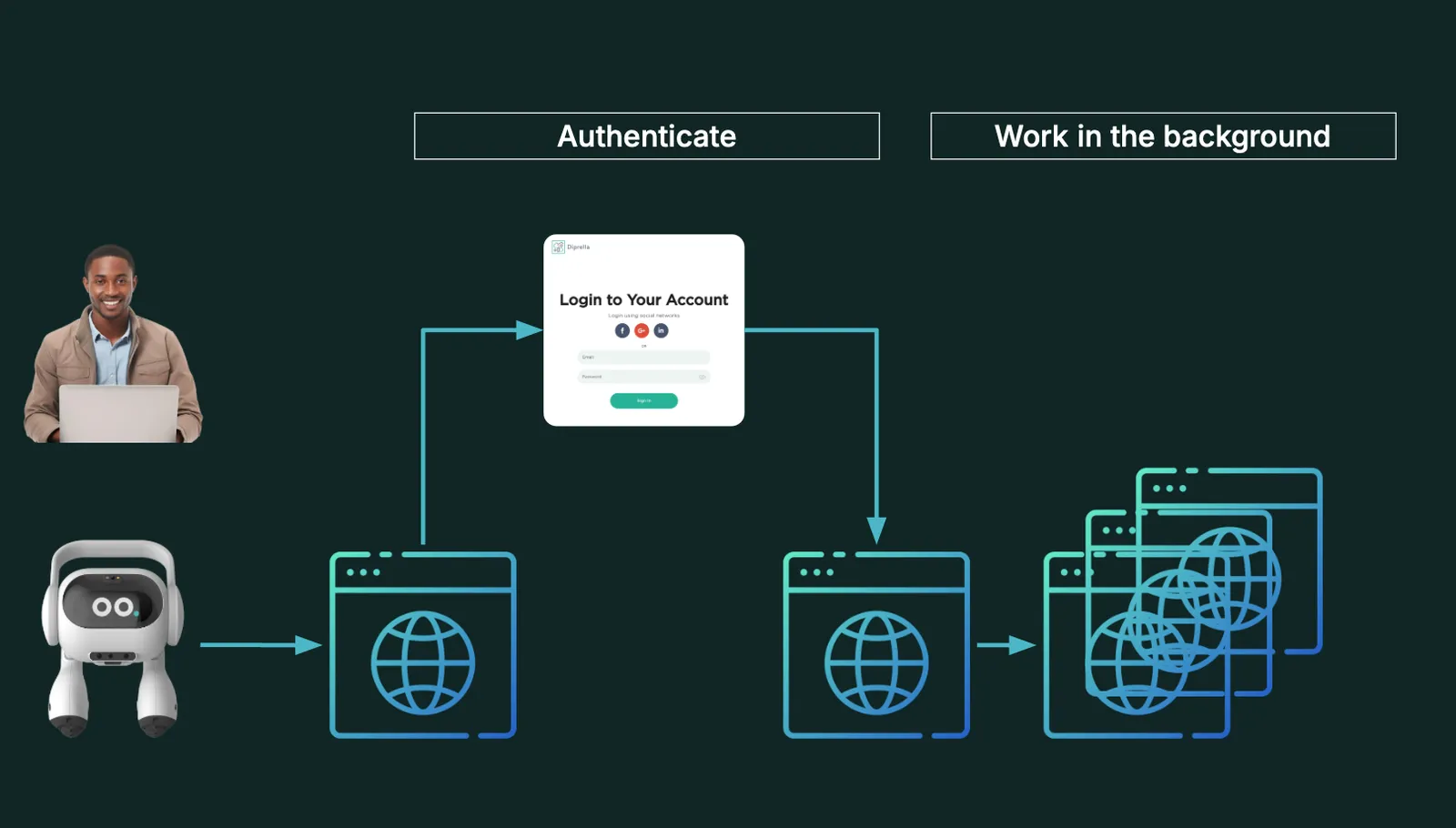
This powerful feature allows you to build applications that can interact with authenticated web services on behalf of your users, while maintaining the highest level of security and privacy.
Residential proxies
There are times when a site blocks requests from a single or a non-residential IP address. In these cases, you can use Airtop’s residential proxy feature to proxy traffic to residential IPs and ensure your traffic is not blocked. We include an integrated residential proxy network with over 100 million residential IPs from 100+ countries. Or if you already have your own proxy vendor or infrastructure, you can use your own.
Where to go from here?
Now that you have a basic understanding of what Airtop is and how it works, you can start building your own applications. We recommend the following resources:
- Check out our Quickstart Guide to get started.
- For more detailed guides on how to use each of our features, check out our How-To Guides section.
- If you need to reference our API, check out our API Reference.
- We have prepared a set of Recipes, fully functioning, open-sourced examples, that you can download and modify to get started quickly.
- Finally, if you get stuck, you can always reach out to us for support.